


E! News
4.34.22K Reviews
App Specs
- Version
- 7.3.0
- Updated On
- License
- Free
- Downloads
- 1,000,000+
- Developer
- Versant Media, LLC
- Categories
- News & Magazines
- Platform
- Android
Screenshots
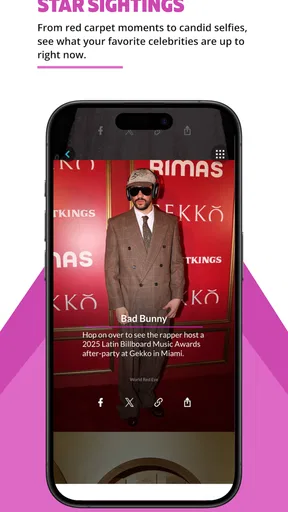
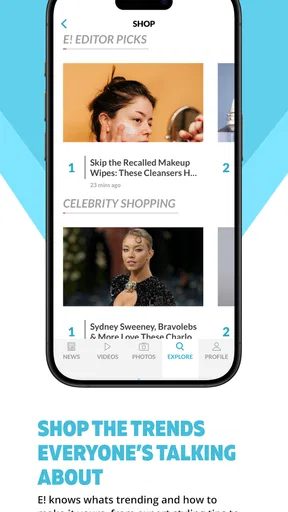
 Analysis by AppCompare
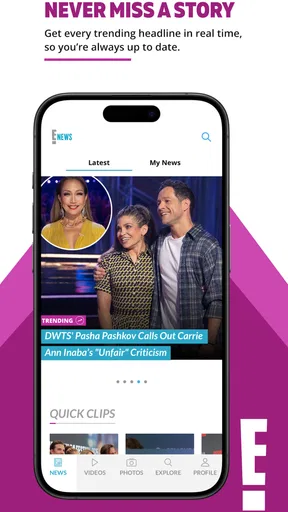
I came away from E! News with a clear impression: it is best understood as a quick, focused way to keep up with entertainment news, not as a complete replacement for a broad news reader. The app belongs to the News & Magazines category, is free to use, and is developed by Versant Media, LLC. Its appeal is straightforward: when I want celebrity, television, film, and pop-culture updates in one familiar place, it gives me a more direct starting point than searching across several websites.
That focus is also the reason I would not recommend it to everyone. If your daily reading is mainly politics, business, local reporting, science, or international affairs, this is not the app I would make your primary news source. But if entertainment is the part of the news cycle you actually want to follow, the focused approach can make the experience feel less cluttered and easier to dip into during spare moments.
How E! News fits into everyday entertainment reading
My preferred way to use the app is in short sessions rather than as a long reading destination. I might open it while waiting for coffee, scan the newest entertainment stories, read one item that catches my attention, and leave without feeling that I have started a major research project. That simple workflow suits the app well because the subject matter is naturally driven by fast-moving headlines, public appearances, television developments, celebrity updates, and wider pop-culture conversation.
The store summary describes an experience built around knowing what matters when you need it. In practice, I read that as convenience rather than a promise that every story will be essential. The value is in reducing the effort needed to see what is happening in the entertainment world. Instead of opening a browser, searching for a familiar name, and sorting through unrelated results, I can begin with an app designed around that interest.
That makes the app particularly useful for readers who follow entertainment casually but consistently. I do not need to remember which publication covered a particular actor, show, or event. I can open one destination and decide from the headlines what deserves my attention. The trade-off is that a focused entertainment feed can also encourage passive browsing, so I find it more useful when I open it with a purpose: checking the latest stories, catching up after being away from the news, or following a topic that has suddenly become prominent.
The interface experience is also shaped by the fact that this is a mobile app rather than a general web search. On a phone, a dedicated destination feels more convenient than repeatedly entering searches into a browser. The app is available at no cost, which lowers the barrier to trying it, especially for someone who wants entertainment coverage without committing to a paid publication. I would still judge its usefulness by how often its coverage matches my interests, rather than by the fact that downloading it costs nothing.
What it does particularly well
The strongest quality is its editorial focus. Many general news apps place entertainment beside dozens of unrelated subjects, which can be useful for broad awareness but inefficient when I only want culture and celebrity coverage. E! News removes much of that distraction. I can approach it with a specific expectation, and that makes the first few minutes of reading easier to manage.
Worth Reading Before You Choose

EA SPORTS FC Mobile 26 Is a Bigger Football Game, but It Takes Time

Flipboard Shows What News Apps Must Do Beyond the Feed

Switching to Android Auto Means Rethinking Your Driving Routine

Google Calendar Makes a Crowded Week Easier to Manage

Ludo King Makes the Most of the Minutes Between Plans

Baby Panda World Brings Quick Play to Modern Phones, but Its Game Library Feels Busy
There is a practical benefit here that is easy to overlook. A focused app can help me separate “I want to know what is happening in entertainment” from “I want to browse the entire internet.” That distinction matters when I am short on time. Rather than opening multiple tabs and getting pulled into unrelated recommendations, I can use the app as a first pass, identify the stories that interest me, and stop there.
It is also a reasonable companion for people who discuss popular culture with friends or follow ongoing television and celebrity conversations. When a story is developing, having a dedicated place to check can be more comfortable than relying on social posts, where headlines may be incomplete or surrounded by speculation. I appreciate that the app gives entertainment news its own reading space instead of treating it as an afterthought inside a general news product.
Another strength is accessibility. The current version is 7.3.0 and supports devices running Android 8.0 or later, so it is aimed at a wide range of Android users rather than only people with the newest phones. I would still keep the operating-system requirement in mind before installing it on an older device. For compatible users, the free entry point makes it easy to test the app during a normal week and decide whether its coverage earns a regular place on the home screen.
The audience response suggests that the app has reached a substantial group of readers: it has more than a million installs, an average rating of 4.3, and roughly seventeen thousand ratings. I do not treat those figures as proof that every reader will enjoy it, but they do indicate that the concept is established enough to have a real user base. The number of written reviews, around four thousand, also gives the app a visible history of user feedback rather than making it feel like an untested newcomer.
Small habits that make the app more useful
I found that the best results come from treating the app as a filter, not as an authority on every subject. When a headline matters to me, I use it as a prompt to read carefully and decide whether I need more context elsewhere. This is especially important with entertainment stories, where a short update can be interesting without explaining the full background. The app works well for discovery; it is less suitable as the only place I would verify a complicated claim.
A second useful habit is to avoid opening it only when I am bored. That sounds minor, but entertainment feeds can turn into endless scrolling when there is no clear goal. I get more value when I decide whether I am catching up on the day, checking a particular area of pop culture, or looking for a story to discuss. This approach keeps the app from becoming a time-filler and makes its focused coverage feel more intentional.
I also recommend comparing the app with the way you currently consume entertainment news before making it a daily habit. If you already follow several trusted publications through a general news reader, the additional app may not add enough convenience. If your current method is scattered searches and social-media browsing, however, a dedicated destination could save time and make the reading process calmer.
For a household with teenagers, the content rating is Teen, so I would not treat the app as a child-focused news environment. That does not automatically make it inappropriate for every younger reader, but it is a useful reminder that entertainment coverage can involve mature themes, celebrity controversies, and subjects better discussed with parental judgment. I would look at the content personally before handing the app to a child.
The limitation I noticed most
The same concentration that makes E! News convenient can make it narrow. I would not use it to replace a general news app because its purpose is entertainment, not balanced coverage of the wider world. Someone who wants one application for headlines across local, national, international, financial, and cultural subjects will probably be better served by a broader news reader.
There is also a difference between being informed and being entertained by updates. A steady stream of celebrity and pop-culture stories can be enjoyable, but not every headline deserves the same attention. I sometimes find myself needing to make that distinction actively. The app can help me see what is being discussed, yet I still have to decide which stories are meaningful, which are light reading, and which require additional context before I form an opinion.
Readers who prefer long investigative articles may also find the experience less satisfying than a magazine subscription or a publication built around deep reporting. That is not necessarily a flaw in this app; it is a question of fit. I see it as a fast-moving entertainment companion. If I want a carefully developed feature, a detailed review, or a wide range of viewpoints on a complex issue, I would look beyond this single destination.
Another trade-off involves attention. A specialized feed is efficient because it removes irrelevant subjects, but it can also reinforce a narrow reading routine. If I open only entertainment apps, I can easily miss important developments outside that area. My solution is to use E! News alongside, not instead of, a broader source. That combination gives me the convenience of focused culture coverage without pretending that one app can meet every information need.
The app’s free price is helpful, but “free” does not automatically mean frictionless. The real question is whether the reading experience fits my habits well enough to justify another app on my phone. For an occasional reader, browser access may be sufficient. For someone who checks entertainment headlines regularly, the dedicated format is more likely to feel worthwhile. I would make that decision after several ordinary days of use rather than after a single quick opening.
Who should install it, and who should skip it
I would recommend E! News to a reader who follows celebrity news, television, film, and the broader entertainment conversation and wants a focused mobile destination. It is especially suitable for someone who prefers short check-ins throughout the day. The app is also a sensible option for people who are tired of sorting entertainment headlines out of a general news feed.
It may be useful for a fan who wants a routine before work or school: open the app, scan the newest entertainment developments, read the few items that genuinely matter, and move on. That workflow is more practical than trying to follow every story through social networks, where the same topic may appear repeatedly in fragmented posts. I would also consider it helpful before a conversation, viewing session, or event when I want a quick sense of what is currently attracting attention.
I would be more cautious about recommending it to someone who wants rigorous, broad news coverage in one place. It is not the right primary choice for a reader whose interests are mostly current affairs, markets, technology, health, or local reporting. I would also steer away from it as a sole source for anyone who expects every story to include extensive background and analysis. A general news application or specialist publication will be a better match in those cases.
For people deciding between this app and a browser, the choice comes down to repetition. If you visit E! News occasionally, a browser may be enough. If you repeatedly search for entertainment updates and want a single, recognizable starting point, the app is more convenient. Compared with social media, it offers a more deliberate news-reading destination; compared with a general news app, it offers greater subject focus; compared with a paid magazine service, it is easier to try because it is free.
The Teen content rating should also influence the decision for families. I would not install it for a young child without checking how its entertainment coverage fits the family’s standards. For older teenagers and adults who already understand that celebrity news can include sensitive topics, the rating provides a useful boundary rather than a reason to dismiss the app entirely.
My verdict after using it as a regular check-in
My recommendation is positive, with a clear condition: use E! News for focused entertainment awareness, not as your complete news routine. Its strongest feature is not complexity but purpose. It gives readers a direct way to check the entertainment conversation without first wading through unrelated sections, and that can be genuinely valuable during short breaks or busy days.
I like that Versant Media, LLC has positioned the app around a recognizable need rather than trying to make it serve every kind of reader. The free price and broad Android compatibility make experimentation easy, while the established user base and 4.3 average rating suggest that the format works for many people. Those details do not remove the need for personal judgment, but they make the app a credible choice in its niche.
The honest limitation is that its niche is also its boundary. I would pair it with a broader news source, and I would not rely on a headline alone when a story has serious personal or public consequences. Used that way, the app becomes a convenient entertainment desk: quick to open, easy to browse, and focused enough to save time.
My final take: install it if entertainment news is a regular part of your day and you want a dedicated place to follow it. Skip it if you are looking for comprehensive journalism, deep analysis, or one app covering every major news category. For the right reader, E! News is a practical companion rather than an all-purpose news solution, and that focused role is exactly where I think it performs best.
Pros
- Covers celebrity news
- entertainment
- and pop culture in one place.
- Short articles make it easy to catch up during quick breaks.
- Includes photos and videos alongside many entertainment stories.
- Push alerts can keep users updated on major celebrity developments.
- Familiar E! branding may appeal to fans of its television coverage.
Cons
- Content can feel heavily focused on celebrity gossip and entertainment trends.
- Frequent notifications may become distracting without careful settings.
- Some stories may prioritize speed over detailed reporting or context.
- Advertising can make parts of the browsing experience feel cluttered.
- Availability and features may vary depending on region and device.
FAQs for E! News
What is the E! News app used for?
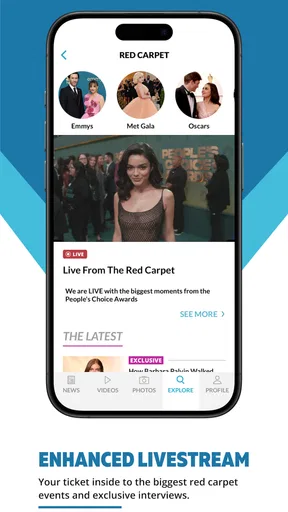
The E! News app is designed for people who want quick access to entertainment coverage, celebrity news, television updates, movie stories, red-carpet events, and pop-culture trends. After exploring the app, I found that its main focus is keeping readers updated through a mixture of written articles, photos, videos, and continuously refreshed headlines rather than offering a traditional social network or messaging experience.
Is the E! News app free to download and use?
E! News can generally be downloaded free of charge on supported Android and iOS devices. Most of the news content is available without paying for a subscription, although the app may include advertising and some features or video content can depend on regional availability. Before downloading, users should also check the current store listing because access, supported devices, and content policies may change over time.
What type of content can I find on E! News?
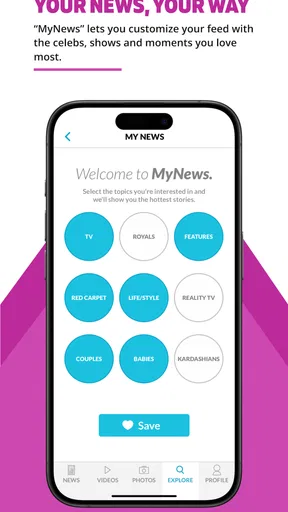
The app covers a broad range of entertainment topics, including celebrity relationships, breaking pop-culture stories, television and streaming releases, film news, music, fashion, award shows, and exclusive interviews. Its content is particularly useful for readers who enjoy short, frequently updated articles and visual coverage. The exact categories and available stories may vary depending on current events and your location.
Does E! News provide videos and live entertainment coverage?
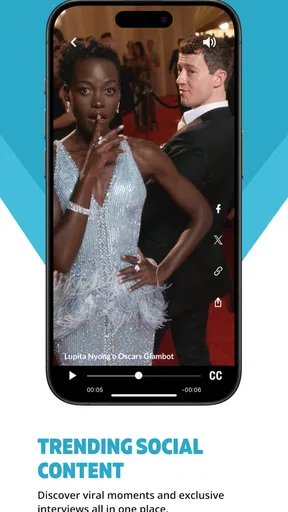
Yes, E! News may provide video clips, interviews, event highlights, red-carpet coverage, and other visual entertainment content alongside its written articles. In my experience, video availability can depend on licensing agreements, location, internet connection, and whether the relevant event is currently taking place. Users should also expect advertising or links to related NBCUniversal and E! programming in some sections.
Does the E! News app require an account or collect personal information?
You can usually browse much of the E! News content without creating an account, which makes the app convenient for casual readers. However, optional features such as personalized experiences, notifications, saved content, or participation in certain services may request additional information. Before installing, review the app-store privacy details and permissions, especially if you prefer to limit notifications, tracking, or personalized advertising.


